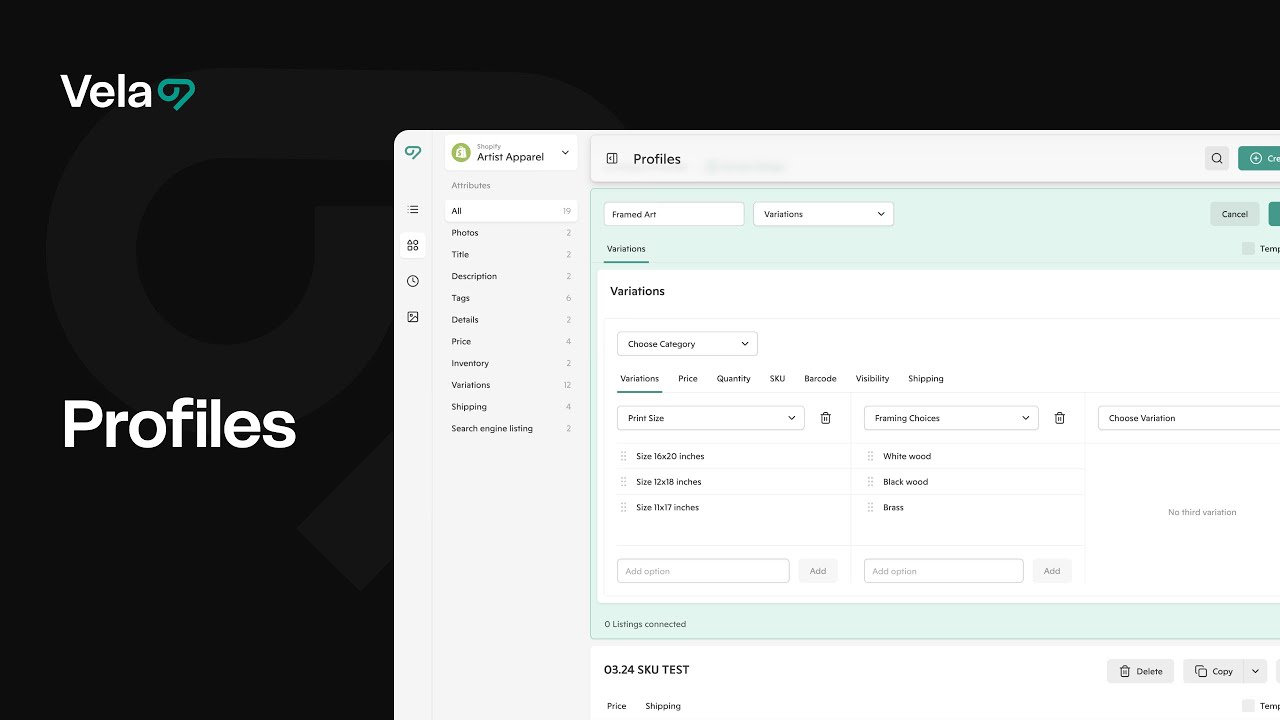
Profiles make it easy to keep your listings consistent and up to date—even when your products include multiple variations like size, color, or material.
With Profiles, you can update shared variation structures once, apply those updates across multiple listings, and retain any unique price or inventory details that vary by listing.

How to...
- Understand how profiles handle variations
- Retain prices, SKUs, quantities, or processing profiles
- Scale profiles with variations
- Troubleshoot profiles with variations
1. Understand how profiles handle variations
When you apply a profile that includes variations, all variation data inside that profile replaces the entire variation section in each connected listing.
This allows you to:
- Standardize variation names, order, and visibility across listings
- Add or remove options (like adding XXL or hiding Out of Stock)
- Update processing profiles for each variation combination
However, since a profile overwrites all variation data it includes, it’s important to only include variation sections that you want to edit.
Any variation fields left blank in a profile will overwrite those same fields as blank in connected listings.
💡 Tip: The easiest way to create a profile that includes variations is by saving it from an existing listing that already has the correct variation structure. You can then edit and reuse that structure safely.
2. Retain prices, SKUs, quantities, or processing profiles
The Retain feature lets you safely update shared variation information across listings while keeping certain per-listing variation details (like prices or SKUs) unique.
You’d use Retain when:
- Each listing uses the same variation structure (Size and Color, for example)
- You want to rename or adjust shared variation options (like Red Heather → Rust, or hide Small)
- But you need each listing’s unique variation prices, SKUs, quantities, or processing profiles to remain unchanged
When you enable Retain for one or more of those fields, Vela preserves each connected listing’s existing data for those fields, while applying all other variation updates from the Profile—like option names, visibility, and new choices.
💡 Example:
You sell mugs with variations for Design and Size. Each listing already has custom prices for its design variants.
With Retain Prices selected, you can add or rename sizes and hide sold-out designs without overwriting your pricing.
How to Make Retain Work Smoothly
For Retain to function properly, your Profile and listings must have an identical variation structure.
That means:
- Same variation titles (Size, Color, etc.)
- Same order (Size → Color, not Color → Size)
- Identical spelling, punctuation, and option names
- Same number and type of options under each variation
If they don’t match, Vela can’t map the variation fields correctly, and the Profile won’t connect when Retain is enabled.
⚠️ Important: Retain only works when those fields (price, SKU, quantity, or processing profile) are set at the variation level (“Individual prices” in Etsy), not at the listing level.
Editing Variation Structures Safely
Once your listings are connected to a Profile:
- You can safely rename options, toggle visibility, or add/remove variation options directly inside the Profile.
- When you save the Profile, those changes sync automatically to all connected listings.
- If you make edits directly in a listing instead, they won’t carry back to the Profile until you re-save that listing as a new Profile.
💡 Tip: Always make structural edits (like adding new options) inside the Profile—not individual listings—to keep everything in sync.
3. Scale profiles with variations
- Keep each Profile connected to 500 listings or fewer to prevent performance slowdowns or marketplace rate limits.
- For listings with many variations (100+), use smaller groups or split your Profile into copies—each managing part of your catalog.
- To “split” a Profile, use Copy Profile, then connect some listings to the original and some to the copy.
- You can also copy Profiles between shops or even across platforms. Just review the Profile after copying.
- Vela supports variation limits and field structures for each channel. For instance, Shopify and Etsy currently allow 3 variations.
4. Troubleshoot profiles with variations
If your Profile won’t connect or your updates don’t appear:
- Check that any Retain fields are selected/deselected correctly.
- Ensure variation structures in the Profile and listings match exactly.
- Confirm that domestic/global pricing or US-specific pricing features in Etsy are turned off, as these settings prevent all third-party price updates.
Once you disable those settings in Etsy, re-save your Profile to resend updates. - If your updates still don’t appear after a successful sync, you may have hit a platform rate limit. Wait 24 hours before retrying with a smaller batch (under 500 listings).